Manage your wallets
Rename wallets, tag burners, choose which wallets count in your total, and filter or sort the list.
The wallets screen is where you look after everything you track. Open it with the wallet button at the top of Kist.
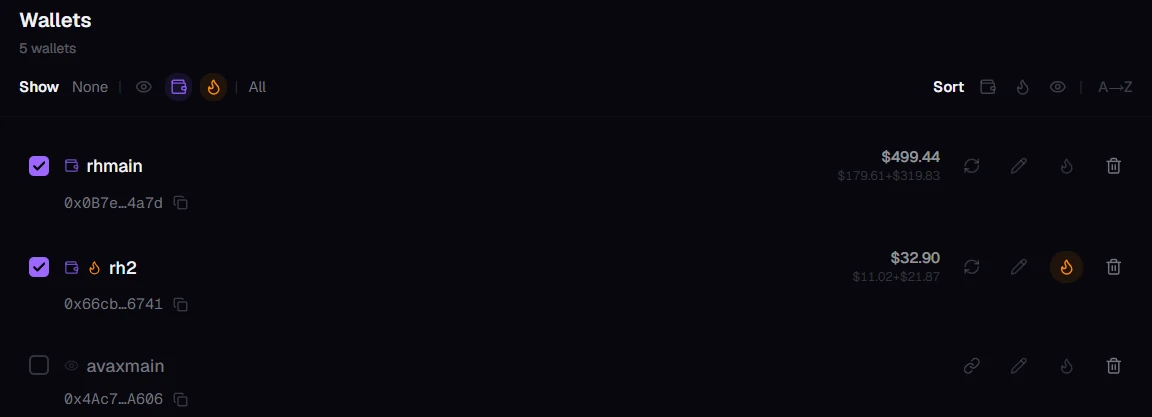
Choose what counts
Tick the wallets you want in your total. Unticked wallets stay in your list but aren't counted, which is handy for a friend's wallet or an old one you still want to keep an eye on.
On each wallet
- Copy the address with the icon next to it.
- Refresh that wallet's balances.
- Rename it with the pencil.
- Tag it as a burner with the flame.
- Remove it with the bin. This only removes it from Kist; the wallet itself is untouched.
- Connect or reconnect it. See Connect your wallet.
Burner wallets
A burner is a throwaway wallet for mints or untested contracts. Tagged burners stand out everywhere in Kist, swaps included, so if real value lands in one you'll notice and can move it somewhere safer.
Show and Sort
When the list grows, use Show to filter it to watched, connected or burner wallets (or all, or none), and Sort to group it the same way or order it A to Z.
Still stuck, or found something broken? Tell Simon on X: @SimpleSimon872