Your Avalanche portfolio, every token and NFT
Kist tracks Avalanche wallets in full: AVAX, the long tail of small tokens, and every NFT, grouped by collection and priced at floor. It all adds up with your Ethereum, Robinhood Chain and Base holdings into one total.
AVAX and the long tail
Every token at the address. Kist reads Avalanche directly, so alongside AVAX you see the small community and meme tokens too, each with its balance and value.
Honest prices. Tokens are priced wherever a real market exists. When one doesn't, Kist shows the balance and labels it unpriced instead of guessing, so your total stays trustworthy.
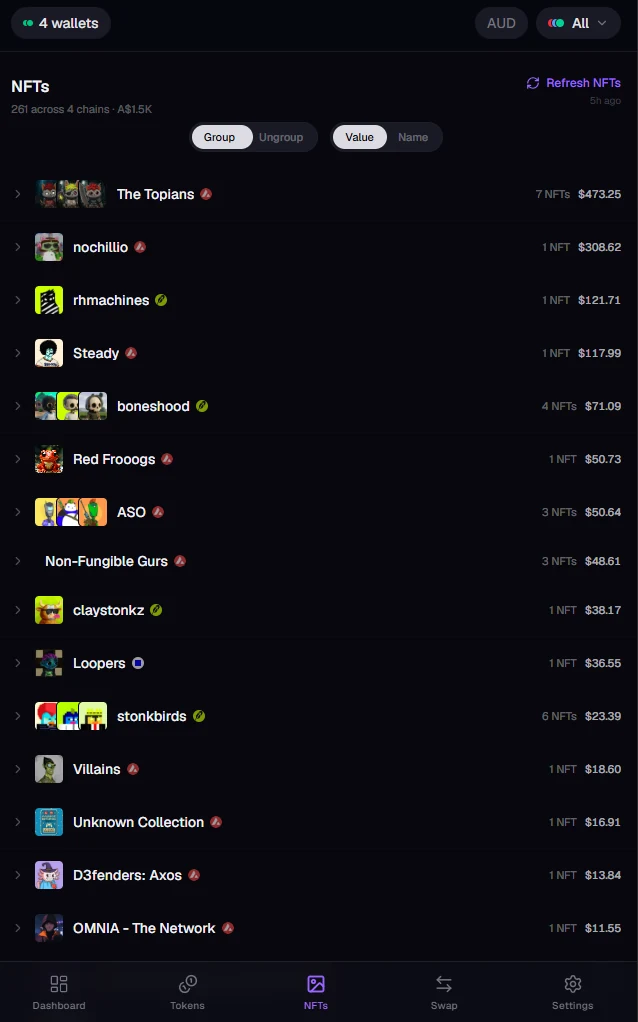
Avalanche NFTs, grouped and priced
Collections at a glance. Your NFTs are grouped by collection, with how many you hold and what they're worth at floor. Sort by value or name, or ungroup to see every piece.
Every chain in one gallery. Avalanche collections sit next to your Ethereum, Robinhood Chain and Base ones, each marked with its chain, or filter down to Avalanche alone.
Ready for token-bound accounts
Some NFTs own a wallet of their own (ERC-6551). Kist checks your Avalanche NFTs for one automatically, and when it finds one, it shows what's inside and what it's worth.
Move AVAX wherever you need it
Swap tokens on Avalanche, or send AVAX straight across to another chain in one step, like ETH on Robinhood Chain. Routes come from Li.Fi, and you see the rate and fees before you review.
Swaps use the wallets you've connected. Every transaction is approved in your own wallet, never by Kist.
How watching and connecting wallets works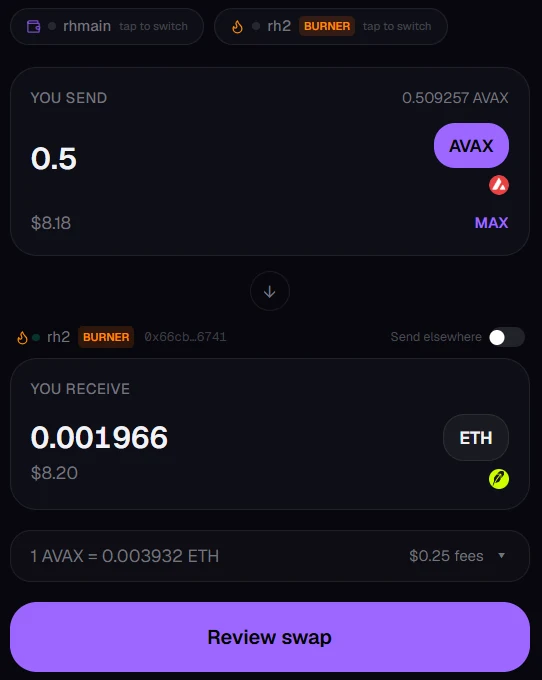
Start tracking in a minute
- Open Kist. It runs in your browser; there's nothing to download or sign up for.
- Add your address. Tap the wallet button at the top, then Add wallet and Watch address, and paste in your Avalanche C-Chain address (0x…) or ENS name.
- Look inside. Your tokens and NFTs appear with everything else. Use the chain filter to see Avalanche on its own.
Common questions
Which Avalanche address do I use?
Your C-Chain address, the one starting with 0x. That's the Avalanche chain where tokens and NFTs live, and it's what wallets like Core and MetaMask show you. X-Chain and P-Chain addresses (starting with X- or P-) aren't supported.
Does Kist show staked AVAX?
Staking tokens that live on the C-Chain show up like any other token. AVAX staked directly on the P-Chain doesn't, since Kist reads C-Chain addresses.
Can Kist move my funds?
Not from an address you're only watching. Adding an address lets Kist read its public balances, nothing more. Kist never asks for your recovery phrase or private keys.
See your Avalanche holdings
Paste in an address and watch your tokens and NFTs add up.