Track all your crypto wallets in one place
Your main wallet, your cold storage, the burner you mint with, a friend's address you keep an eye on. Kist puts them all on one keyring across Avalanche, Ethereum, Robinhood Chain and Base, and adds them up into a single total.
Two ways to add a wallet
Watch it. Paste in any address or ENS name and Kist reads its balances, NFTs and token-bound accounts from the chain. It's read-only: nothing can be signed or sent. Perfect for cold storage, a project treasury or anyone else's public wallet.
Connect it. Connect a wallet once with WalletConnect and Kist remembers it as yours, marked with a purple wallet icon and ready for swaps and bridges. A green mark shows it's connected right now; if not, one tap reconnects it. Every transaction still needs your approval in your own wallet app, and Kist never asks for your recovery phrase or private keys.
Name them, tag them, choose what counts
Give each wallet a name you'll recognise. Tag throwaway wallets as burners and they stand out everywhere, swaps included, so if something valuable suddenly lands in one, you'll notice and can move it somewhere safer.
Tick the wallets you want counted and Kist adds just those into your total. Untick one to set it aside without deleting it. When the list gets long, filter or sort it by your own wallets, burners or watch-only.
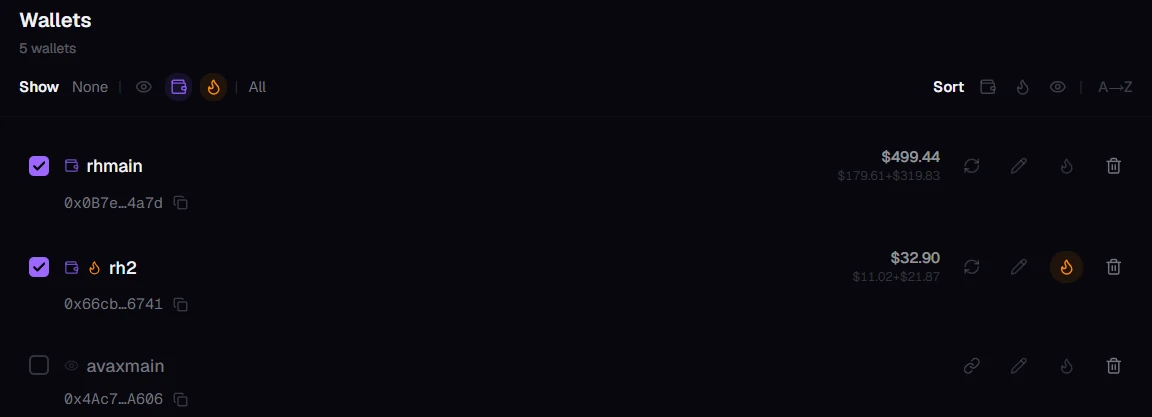
One total, or one wallet at a time
The top of the dashboard shows the total for the wallets you've ticked, split by chain. Each wallet shows its own value on the wallets screen, and the chain filter narrows everything down to a single chain.
Tracking Robinhood Chain in Kist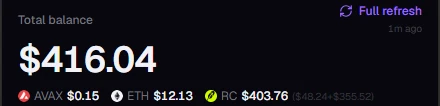
Add your first wallets
- Open Kist. It runs in your browser; there's nothing to download or sign up for.
- Add a wallet. Tap the wallet button at the top, then Add wallet. Choose Watch address to paste an address or ENS name, or Connect wallet for one you own.
- Repeat and name. Add as many as you like, give each a name, and tick the ones you want in your total.
Common questions
Is it safe to add a wallet address?
Yes. A wallet address is public, and adding one only lets Kist read what's at it. Nobody can move funds with an address alone. Never share your recovery phrase or private keys with any app or person; Kist will never ask for them.
Where are my wallets saved?
In your browser, on this device. There's no account, so on a new phone or computer you add your wallets again.
What is a burner wallet?
A throwaway wallet you use for things like mints or new contracts, so your main wallet stays out of harm's way. Burners shouldn't hold much for long, so Kist makes them stand out: if one suddenly holds real value, you'll see it and can move it to a safer wallet.
Can I track someone else’s wallet?
Yes. Wallet addresses and their holdings are public on the blockchain, so you can watch any address, read-only.
Put your wallets on one keyring
Paste in an address or two and see them add up.